

Get hands-on with physical AI and iterate on it in-house
Connect robots and cameras to record data, let AI evaluate and tag it, and review and correct the results yourself — all on one screen. Your own team can iterate on site and bring physical AI development in-house.
* Storing data such as recordings is prepaid. Top up from ¥1,000 ($10 in USD); storage is ¥7.5 (5¢ in USD) per GB per month, excl. tax.
For physical AI data, quality matters as much as quantity
Deciding which data to train on takes one setup that covers recording, evaluation and labeling.
Setting up development and recording
Connecting and synchronizing robots and cameras has to be built from scratch.
Setting up evaluation and labeling
Defining evaluation criteria and managing tags also takes work before the data is usable.
Development flow, from data collection to deployment
With ACTOMIQ Build, you can run this flow with no code.
01
Record
Capture motion and video in sync
02
Label
Rate success, failure and quality
03
Dataset
Filter and organize by condition
04
Train
Tune the model
05
Deploy
Apply it to the robot
Iterate in-house and own your development
Your on-site team repeats the cycle of collecting, evaluating and revising, and your own know-how feeds back into development.
Key features
No-code development
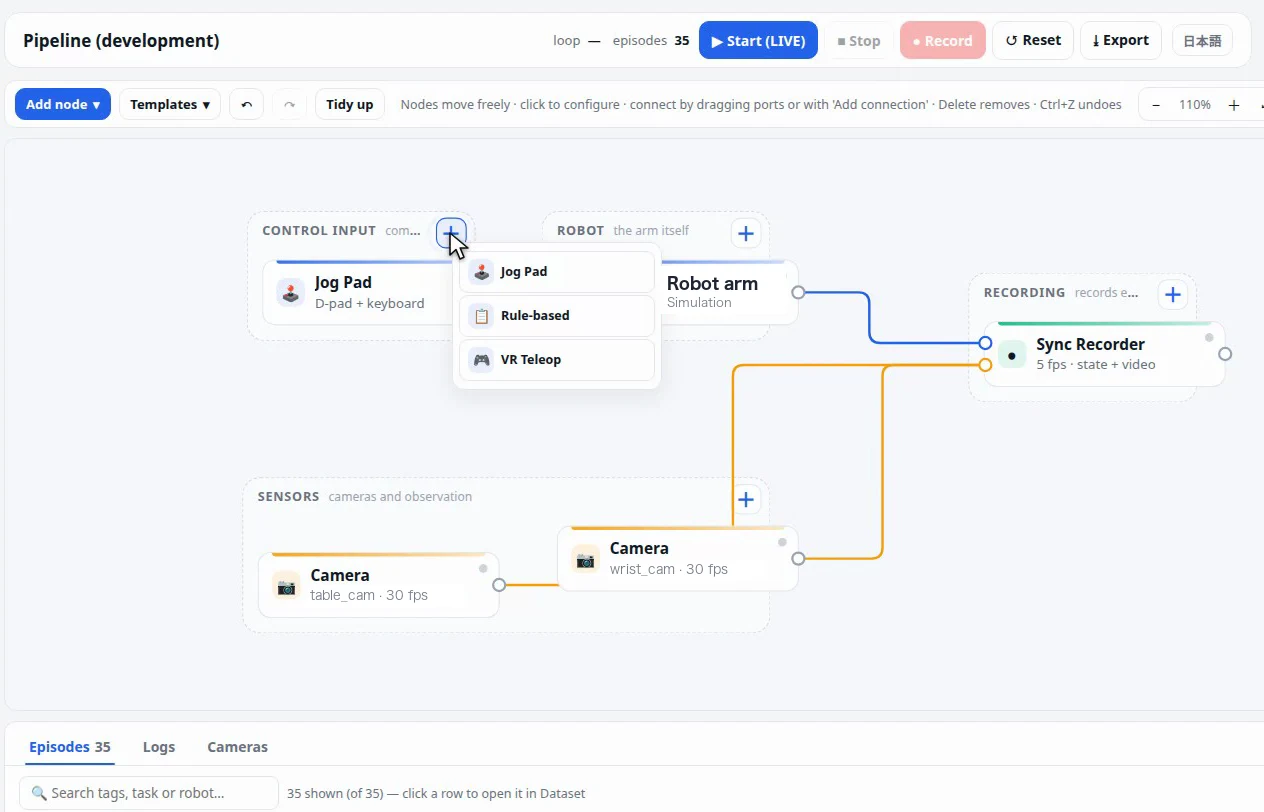
Build the recording setup by connecting nodes
Connect robots, cameras, control devices and recorders as nodes to assemble your recording setup. Invalid connections are rejected on the spot.
Data visualization
Check AI evaluations and tags, then correct them
AI evaluates recorded data and adds success/failure labels and tags automatically. You can also edit evaluations and tags manually while reviewing the video and analysis.
Robots and environments
Develop in simulation and on real robots
Simulation supports any robot with a URDF or USD model. With real robots, connected devices are detected automatically.
Teleoperation and synced recording
Record motion and video as you operate
Operate the robot with a keyboard, 3D mouse or other device, and record motion and multiple camera feeds in sync — including motion data for training VLA and other models.
AI assistant
Estimate failure causes and get suggested fixes
Estimates the cause of a failure from the analysis data and suggests improvements. It also answers questions about using the tool and about training data.
See it in action
Real robot
Simulation
* All videos are played at 2x speed.
Verified on real robots

Using a different robot? Ask us.
How onboarding works
01
Consultation
We learn about the target task, your robots and cameras, and your site environment.
02
Validation in simulation
Before setting up real hardware, we validate the workflow from recording to dataset in simulation.
03
Real robot & data collection
We connect your real robots and cameras and collect data on site.
04
Train, deploy, improve
We deploy the trained model to the robot and keep improving it based on the results.
Development work by our affiliate Airion
Press release2026.09.24
Airion Partners with Yazaki Corporation to Enable Self-Driven Physical AI Development on the Factory Floor
Airion is providing its physical AI development service to Yazaki. Airion engineers support the first phase, with the goal of Yazaki's own teams running the cycle from data collection and model validation to robot deployment and improvement.
Read on PR TIMES (Japanese)




* Collaborations and contract development by our affiliate Airion Inc. using ACTOMIQ.
Plans
Cloud
No monthly fee*
No environment to set up — start using it right away.
* Storing data such as recordings is prepaid. Top up from ¥1,000 ($10 in USD); storage is ¥7.5 (5¢ in USD) per GB per month, excl. tax.
Start free on the cloud editionOn-premises
Contact us
For sites without internet access, this edition runs entirely on your premises. We handle everything from setup to handover.
Request a demo / consultation
Questions like "Will this work with our robot?" are welcome too.